
Guide
SponsorBlock in SmartTube: Skip Sponsors Without Touching the Remote
SponsorBlock in SmartTube skips sponsored segments, intros, outros and filler automatically, using community marks. Set it once and forget it.

Contents On this page
SponsorBlock is the quiet feature that makes SmartTube feel different from the YouTube app on TV. It skips the sponsored segment inside a video, the long intro, the outro asking you to subscribe, and the filler in between, without you touching the remote. It works because viewers mark those segments, and SmartTube trusts the marks. Here is how it works, what it skips, and how to tune it. Start from the SmartTube app home page if you still need the install itself.
What SponsorBlock actually is
SponsorBlock is a community database of segment marks. When a viewer spots a sponsored read in a video, they mark where it starts and where it ends, and that mark is shared. SmartTube checks the marks for each video you play, and when playback reaches a marked segment, it jumps past it. The skip takes a fraction of a second, and a small note on screen tells you what was skipped.
What it skips by default
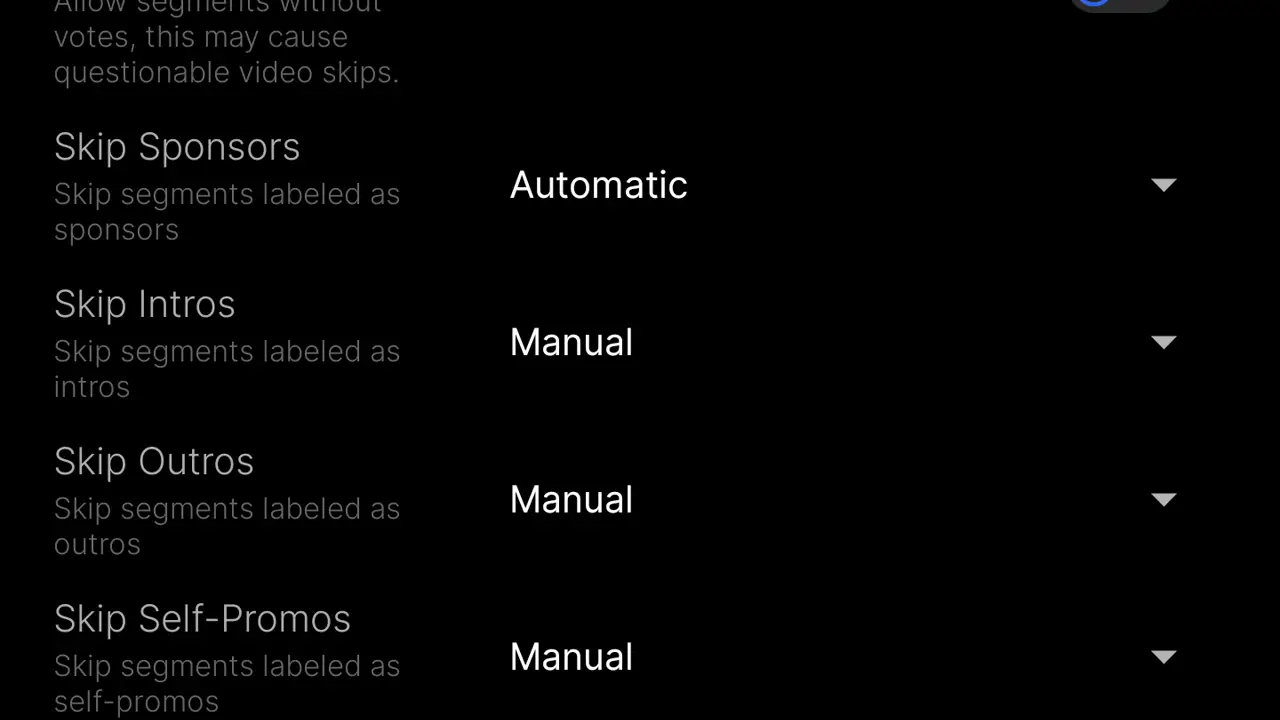
By default SmartTube skips sponsored segments, and it can also skip intros, outros, interaction reminders, self promotion and filler. Each type is a separate switch, so you can keep the intro of a channel you like and skip only the sponsor reads. The defaults suit most people, and the switches live in Settings under SponsorBlock, where you can see every category with a plain description.
Who marks the segments
The marks come from viewers, not from the app. Someone watching a video marks the sponsor read, other viewers vote on whether the mark is right, and accurate marks rise while bad ones sink. Popular videos usually have marks within hours of release, and older videos are well covered. A video with no marks simply plays straight through, exactly as it would without SponsorBlock.
Tuning the skips to your taste
Open Settings, then SponsorBlock, and you will find a switch for every segment type plus a behaviour choice: skip automatically, show a skip button, or ignore. Automatic is the default and suits the sofa, because nobody wants to grab the remote mid video. If a creator does sponsor reads you actually enjoy, turn off the sponsor category for that channel, and the rest keeps skipping. The remote shortcuts guide shows how to jump back quickly if a skip ever lands wrong.
When a skip lands wrong
Marks are made by people, so they are occasionally wrong: a segment starts a few seconds early, or a genuine part of the video gets marked as filler. SmartTube shows a brief note when it skips, and the seek bar keeps the skipped part visible, so you can jump back with one press. If a channel is marked badly again and again, turn SponsorBlock off for that channel in its settings rather than fighting it every video.
SponsorBlock is not an ad blocker
It helps to separate two different things. SmartTube plays videos without video ads, which is the app itself. SponsorBlock handles the sponsor reads inside the video, which are part of the video file. One removes the interruptions before and during playback, the other removes the interruptions baked into the content. Together they are why a twenty minute video takes twenty minutes.
Does it slow playback down
No. The marks for a video are fetched when the video loads, which takes a moment you will not notice, and the skip itself is instant. On a slow connection the marks may arrive after playback starts, in which case the first sponsor read in a video can slip through once. After that the marks are cached, so the next video from the same channel skips cleanly. If you want the details on smooth playback, the 4K buffering fixes guide covers the network side.
Conclusion
SponsorBlock turns the remote into a spectator. Set the categories once, leave the behaviour on automatic, and the sponsor reads, long intros and filler pass by without you noticing. When a mark is wrong, one press takes you back, and life goes on.
Quick Answers
Is SponsorBlock on by default in SmartTube?
Yes. Sponsored segments are skipped automatically, and you can switch each segment type on or off in Settings under SponsorBlock.
Can I turn SponsorBlock off for one channel?
Yes. Open the channel, look for its SponsorBlock options, and disable skipping there. Other channels keep skipping as normal.
Why did a video play a sponsor read anyway?
The video probably had no community marks yet, or the marks arrived after playback started. Popular videos are usually marked quickly, and the next video skips cleanly.
Does SponsorBlock work on every video?
It works on videos that have community marks. Videos with no marks play straight through, with nothing skipped.