
Guide
How to Install SmartTube on Android TV and Fire TV
Install SmartTube on your Android TV or Fire TV the calm way: allow installs from unknown sources, sideload the APK, and open it with the remote.

Contents On this page
Installing SmartTube takes about ten minutes, and most of that is finding the right setting on your TV. The app is not in the Play Store, so you install it by sideloading the APK file, which is a normal Android TV feature. Start with the file from the SmartTube APK home page, then follow the steps below in order on your TV.
Get the APK file first
Download the SmartTube APK to a place your TV can reach. The simplest route is the Downloader app on Fire TV, or a browser download on Android TV followed by a file manager. Keep the file in Downloads so you can find it again, and check that the download finished fully before you tap it, because a half downloaded file is the most common reason an install refuses to start.
Allow installs from unknown sources
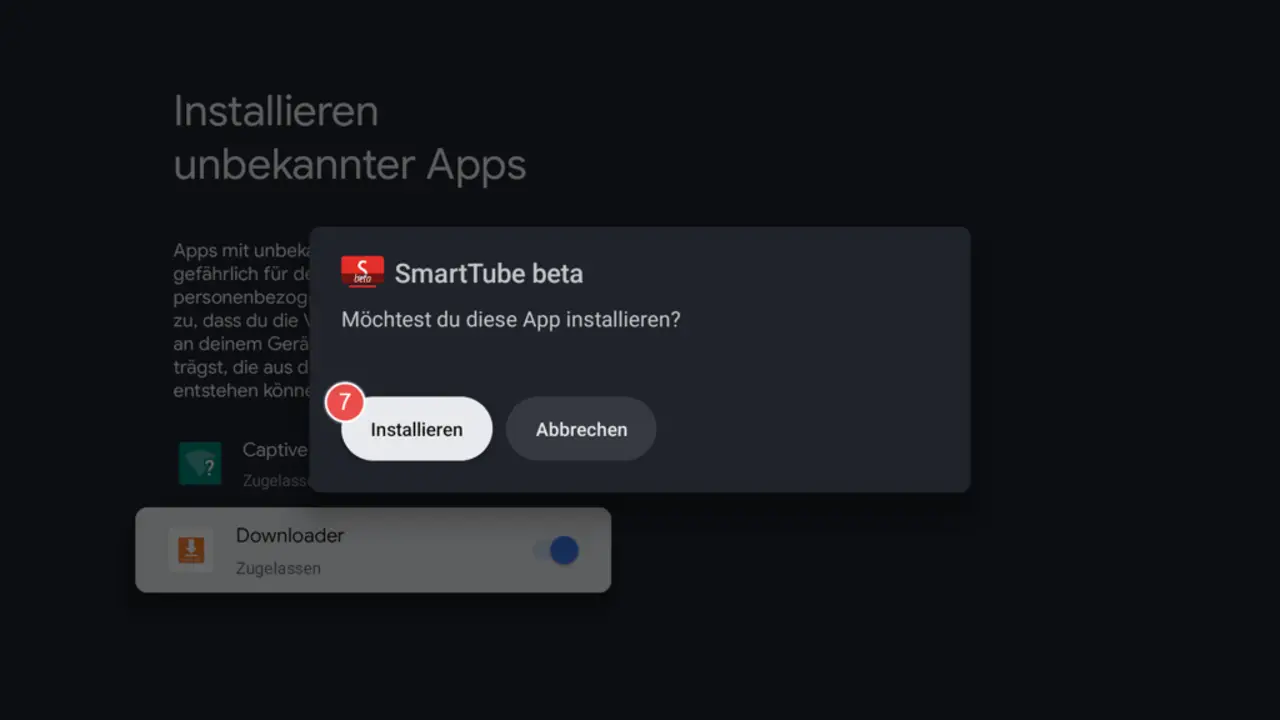
Android TV blocks installs from outside the store until you allow them. Open Settings, then Apps, then Security and Restrictions, and switch on Unknown Sources for the app you will install from, usually your browser or your file manager. This permission is per app, so allowing your browser does not open the door for everything else on the TV. Our walkthrough for SmartTube on Fire TV Stick shows the same screen on Amazon hardware.
Install it on Android TV
Open your file manager, find the APK in Downloads, and select it. Android shows an install screen with the app name and the permissions it asks for. Press Install, wait a few seconds, and press Done rather than Open, so you can check the icon landed in your apps row first. If the TV says the app is not installed, the file is usually incomplete, so download it again on a steady connection.
Install it on Fire TV
On Fire TV the flow is nearly the same, with one extra screen. Open Settings, then My Fire TV, then Developer Options, and switch on Install Unknown Apps for the Downloader app. Then open Downloader, enter the short download code for the project, fetch the file, and install it when prompted. The Fire TV guide covers the Downloader steps in full if you want screenshots of each screen.
First open: what to expect
Open SmartTube from your apps row and give it a moment on first launch. The home screen loads a grid of recommended videos, with Home, Search, Trending and Library in the left rail. There is no account screen waiting for you, and nothing forces a sign in. Press the search button on your remote, try a channel you watch often, and you will know within a minute whether the layout suits your evenings.
Sign in or skip it
SmartTube works without any account, and that is how most people start. If you want your subscriptions and watch history, you can sign in with a Google account from Settings, and the app walks you through a code on your phone. Signing in is optional, and skipping it changes nothing about playback, picture quality or SponsorBlock. The no account setup is covered in using SmartTube without a Google account.
If the install fails
Three fixes solve nearly every failed install. First, free some storage, because a TV with less than a few hundred megabytes free refuses installs silently. Second, re-download the file, because an interrupted download is the usual culprit. Third, check the unknown sources switch is on for the exact app doing the installing, not just for the browser. If it still fails, restart the TV once and try again, which clears the installer state.
Conclusion
Installing SmartTube is a short job once you know where the unknown sources switch lives. Fetch the file, allow the install, open the app, and decide about signing in later. The remote does the rest, and the big screen does what it was built for.
Quick Answers
Do I need a computer to install SmartTube?
No. Everything happens on the TV: the Downloader app on Fire TV, or a browser and file manager on Android TV. A computer is never required.
Is it safe to allow installs from unknown sources?
The switch only allows the one app you pick, such as your browser or file manager, to install files. Turn it off again after the install if you prefer, and SmartTube keeps working.
Where is SmartTube after installing?
It appears in your apps row on Android TV, or in Your Apps and Channels on Fire TV. If it is missing, open Settings, then Apps, and look for it in the installed apps list.
Can I install SmartTube on a phone?
No. SmartTube is built for Android TV and TV boxes, with a remote control interface. Phones and tablets are not supported.